About GWN
GWN App Features 1. Manage the network-based devices, anytime, anywhere 2. Monitor network/device/client status in different time periods 3. Notify alert information once alert event occurs 4. Add device to the network...
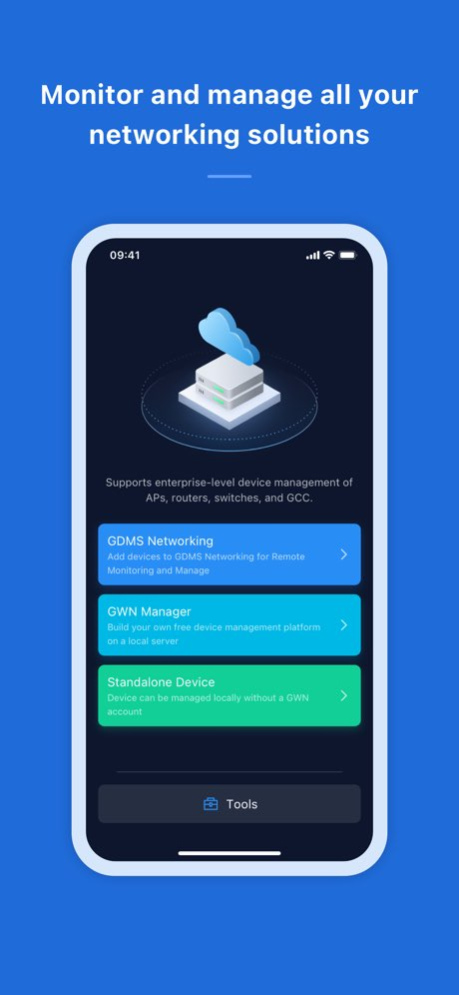
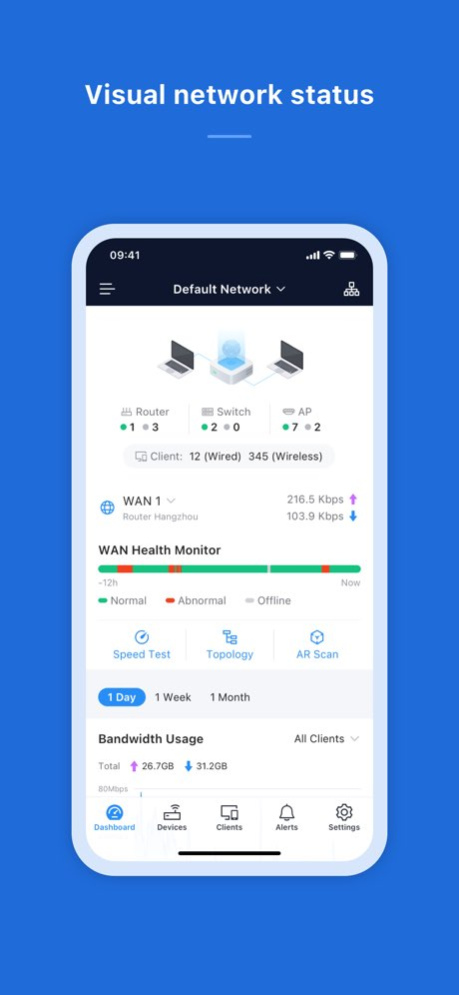
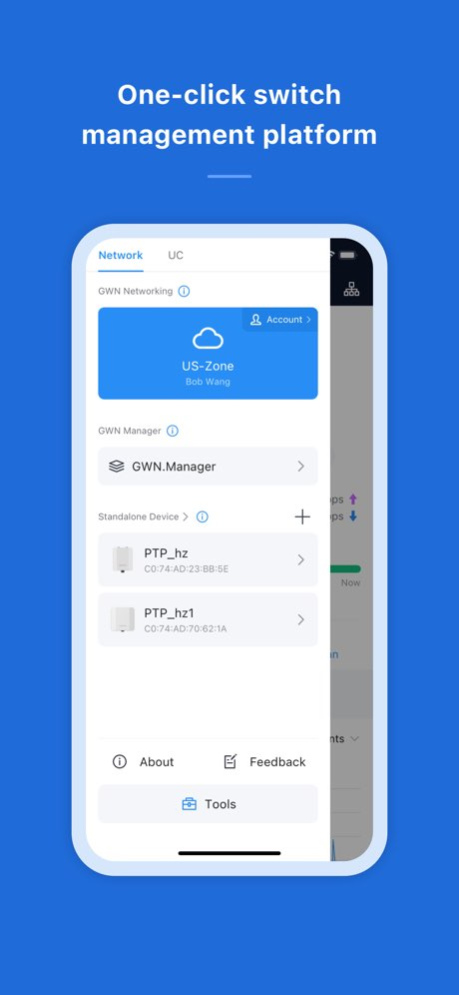
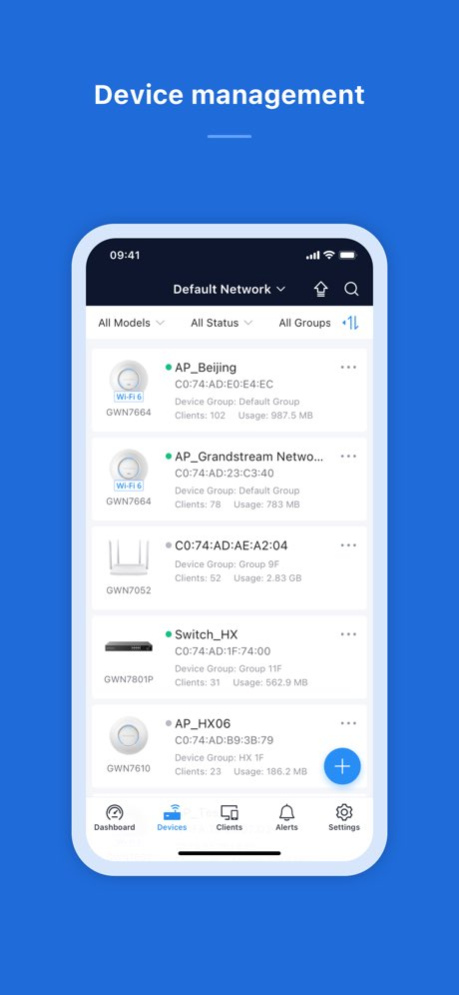
GWN App Features 1. Manage the network-based devices, anytime, anywhere 2. Monitor network/device/client status in different time periods 3. Notify alert information once alert event occurs 4. Add device to the network via phone camera scanning or manually fill in device MAC and its corresponding password 5. Monitor device details including usage and other information 6. Support debug tools for problem-tracking 7. Configure your network as well as devices according to your needs Full Description Manage the network-based devices at anytime from anywhere using iOS phone with the GWN app. This free app links seamlessly with devices registered in GWN.Cloud or GWN Manager, and allows users to conveniently monitor and manage the network established by GWN devices. The GWN app extends web features to iOS phone to allow you to manage the network and be productive while on-the-go: monitor network/device/client status in different time periods, notify alert information once alert event occurs, add device to the network via phone camera scanning or manually fill in device MAC and its corresponding password, monitor device details including usage and other information, support debug tools for problem-tracking, configure your network as well as devices according to your needs, and much more. There is no purchase necessary to manage the network-based devices with the GWN app.
Version History 1.Supports stack switch management (stack creation is not currently supported). [Switch Management] 2.Supports switch management VLAN configuration. [VLAN Configuration] 3.Supports Standby mode for router WAN policies. [Standby Mode] 4.Added IPSG (IP Source Guard) and OWE security options for SSID access security. [IPSG] 5.Supports Wireless Bridge-related alerts. [Alerts] 6.Added Additional Remarks field for supported devices. [Additional Remarks] 1.17.4 Aug 27 1. Supports change the SSID password regularly and set the default SSID based on your organization. 2. Supports wireless router mesh management. 3. Wireguard® Auto Peer supports Allowed IP and DNS Server settings. 4. Optimized WAN Health, increased WAN short-term offline display, and customized thresholds. 5. Internal bug fixes. 1.15.4 May 19 1. Added support Multi-organization management. 2. Added "Single Device" management. Wireless bridge devices can be managed without a GDMS Networking account. 3. Miscellaneous bug fixes. 1.13.6 12/03/2025 1.Internal bug fixes 1.11.7 06/13/2025 1. Optimized the system style. 2. Added support for MAC-based authentication, LACP on switch ports (for GWN78XX versions equal to or higher than 1.0.15.X). 3. Wireless LAN list supports SSID search. 4. Added support automatically adding WireGuard® Peer. 5. Optimized the login process, and added SSO login, Apple ID authentication login, and Google Account authentication login. (GWN Manger) 6. Added support network management and tag management. (GWN Manger) 1.11.4 03/29/2025 1. Internal bug fixes 1.9.17 12/30/2024 1.Support SSO Login and Google & Apple Account Login 2.Added Network Tags for the network list 3.Added manual configuration of WireGuard® 4.Support customize The Network Dashboard 5.Routers and switches support remote tunnel access in Topology 6.Added Defense Alert for DoS/Spoofing attack 7.Added the configuration of target wake-up time for SSID 8.Added MAC authentication for SSID 9.Added VLAN2 configuration in LAN 10.Support the use of public IP for DDNS source IP 11.Internal bug fixes 1.9.4 11/18/2024 1.Support SSO Login and Google & Apple Account Login 2.Added Network Tags for the network list 3.Added manual configuration of WireGuard® 4.Support customize The Network Dashboard 5.Routers and switches support remote tunnel access in Topology 6.Added Defense Alert for DoS/Spoofing attack 7.Added the configuration of target wake-up time for SSID 8.Added MAC authentication for SSID 9.Added VLAN2 configuration in LAN 10.Support the use of public IP for DDNS source IP 11.Internal bug fixes 1.9.3 11/16/2024 1.GWN.Cloud was renamed "GDMS Networking". Unified GDMS entry and email notifications. 2.Supports new account signup. 3.Supports vertical and horizontal display for network topology. 4.Supports router NAT Traversal to remote access devices. 5.Added selections of Icon Types for Clients. 6.Supports binding a client to a specific AP. 7.Optimized the network transfer/sharing logic and alerts. 8.Internal bug fixes. 1.7.18 07/28/2024 1. Added the compatibility to latest GWN Manager. 2. Internal bug fixes. 1.6.21 06/22/2024 1.Added device beta version display and supports for immediate upgrade 2.Supports synchronization of local router WAN configurations 3.Internal bug fixes 1.6.7 03/02/2024 1.Added Vouchers support 2.Added support to upgrade device 3.Added LAN device discovery 4.Added FIDO U2F multi-factor authentication method. 5.Internal bug fixes 1.5.12 01/16/2024 1.Added Vouchers support 2.Added support to upgrade device 3.Added LAN device discovery 4.Added site survey to detect Wi-Fi signal 5.Added link monitor to monitor the connected SSID 6.Added signal mapper to map the site signal based on AR technology 7.Added FIDO U2F multi-factor authentication method. 8.Internal bug fixes 1.5.11 01/15/2024 1. Added GWN7665 support on GWN Cloud. 2. Added support for custom role users to login to GWN APP. 3. Increased Password Security, added password expiration and conflict limits configuration. 4. Some AP models Support 6G configuration. (Only GWN7665 at this moment) 5. Removed SMTP Username/Password requirement. 6. Internal bug fixes. 1.4.9 11/17/2023 1. Added GWN7665 support on GWN Cloud. 2. Added support for custom role users to login to GWN APP. 3. Increased Password Security, added password expiration and conflict limits configuration. 4. Some AP models Support 6G configuration. (Only GWN7665 at this moment) 5. Removed SMTP Username/Password requirement. 6. Internal bug fixes. 1.4.8 11/17/2023 Add Tools entrance both on the login and left drawer page Add GWN Device Discovery and Speed Test under Tools page Add AR Scan feature under Dashboard page Add 3 types of VPN management - PPTP, IPSec, OpenVPN®. IPSec also supports auto networking mode. Add improvement that multiple routers can be managed on one network Add Speed Test for AP device Add Guest tab page under Clients Add 12-hours Internet health monitoring of WAN ports Add Certificates management under Profiles page Add Cloud DDNS service to generate domain name for managed WAN Add VLAN interface configuration under router configuration page Add some new alerts such as abnormal device time, VPN disconnected. Add WiFi6 icon for WiFi6 device to improve visibility Add VLAN ID info under Client Details page Improve the layout, adjust the position of Alerts Support Change Client Hostname Support Device Password option under System page Internal bug fixes 1.3.14 09/23/2023 1.(Beta)Added the unified management for model of GWN7801(P),GWN7802(P),GWN7803(P) 2.Added the support for Device Information, Configuration, and Debug under Device menu for GWN switch models 3.Added the support for GWN switches & port configurations through Global Switch Settings and Port Profiles 4.Added the support of GWN switches' Alert events 5.Internal bug fixes 1.2.13 05/19/2023 Fixed some bugs 1.1.15 01/07/2023 1. Support GWN Router (GWN7052 & GWN7062) unified management 2. Support GWN Switch 4. New UI design 5. Redesign dashboard 6. New classification and layout for some features and settings on Web 7. New Alerts design and support more alert events 8. Optimize clients display, integrate the old Known Clients function into Clients page 9. Optimize SSID Security type 10. Resolved some bugs 1.1.11 12/22/2022 1. Added Vietnamese language support 2. Supported more mobile phone models 3. Fixed some bugs 1.0.8 12/31/2021 1.Fixed some bugs 1.0.6 01/17/2020 1. support the service side select area 1.0.5 12/14/2018 1.Fixed some bugs 1.0.3 09/17/2018 1.fix bug 1.0.2 05/05/2018 1.Update UI 1.0.1 02/11/2018
Previous Versions
Here you can find the changelog of GWN since it was posted on our website on 2023-09-25 11:07:37.
The latest version is 1.17.4 and it was updated on 2026-10-13 23:54:48. See below the changes in each version.
GWN version 1.17.4
Updated At: 2026-10-13
Changes: Version History 1.Supports stack switch management (stack creation is not currently supported). [Switch Management]
2.Supports switch management VLAN configuration. [VLAN Configuration]
3.Supports Standby mode for router WAN policies. [Standby Mode]
4.Added IPSG (IP Source Guard) and OWE security options for SSID access security. [IPSG]
5.Supports Wireless Bridge-related alerts. [Alerts]
6.Added Additional Remarks field for supported devices. [Additional Remarks] 1.17.4 Aug 27 1. Supports change the SSID password regularly and set the default SSID based on your organization.
2. Supports wireless router mesh management.
3. Wireguard® Auto Peer supports Allowed IP and DNS Server settings.
4. Optimized WAN Health, increased WAN short-term offline display, and customized thresholds.
5. Internal bug fixes. 1.15.4 May 19 1. Added support Multi-organization management.
2. Added "Single Device" management. Wireless bridge devices can be managed without a GDMS Networking account.
3. Miscellaneous bug fixes. 1.13.6 12/03/2025 1.Internal bug fixes 1.11.7 06/13/2025 1. Optimized the system style.
2. Added support for MAC-based authentication, LACP on switch ports (for GWN78XX versions equal to or higher than 1.0.15.X).
3. Wireless LAN list supports SSID search.
4. Added support automatically adding WireGuard® Peer.
5. Optimized the login process, and added SSO login, Apple ID authentication login, and Google Account authentication login. (GWN Manger)
6. Added support network management and tag management. (GWN Manger) 1.11.4 03/29/2025 1. Internal bug fixes 1.9.17 12/30/2024 1.Support SSO Login and Google & Apple Account Login
2.Added Network Tags for the network list
3.Added manual configuration of WireGuard®
4.Support customize The Network Dashboard
5.Routers and switches support remote tunnel access in Topology
6.Added Defense Alert for DoS/Spoofing attack
7.Added the configuration of target wake-up time for SSID
8.Added MAC authentication for SSID
9.Added VLAN2 configuration in LAN
10.Support the use of public IP for DDNS source IP
11.Internal bug fixes 1.9.4 11/18/2024 1.Support SSO Login and Google & Apple Account Login
2.Added Network Tags for the network list
3.Added manual configuration of WireGuard®
4.Support customize The Network Dashboard
5.Routers and switches support remote tunnel access in Topology
6.Added Defense Alert for DoS/Spoofing attack
7.Added the configuration of target wake-up time for SSID
8.Added MAC authentication for SSID
9.Added VLAN2 configuration in LAN
10.Support the use of public IP for DDNS source IP
11.Internal bug fixes 1.9.3 11/16/2024 1.GWN.Cloud was renamed "GDMS Networking". Unified GDMS entry and email notifications.
2.Supports new account signup.
3.Supports vertical and horizontal display for network topology.
4.Supports router NAT Traversal to remote access devices.
5.Added selections of Icon Types for Clients.
6.Supports binding a client to a specific AP.
7.Optimized the network transfer/sharing logic and alerts.
8.Internal bug fixes. 1.7.18 07/28/2024 1. Added the compatibility to latest GWN Manager.
2. Internal bug fixes. 1.6.21 06/22/2024 1.Added device beta version display and supports for immediate upgrade
2.Supports synchronization of local router WAN configurations
3.Internal bug fixes 1.6.7 03/02/2024 1.Added Vouchers support
2.Added support to upgrade device
3.Added LAN device discovery
4.Added FIDO U2F multi-factor authentication method.
5.Internal bug fixes 1.5.12 01/16/2024 1.Added Vouchers support
2.Added support to upgrade device
3.Added LAN device discovery
4.Added site survey to detect Wi-Fi signal
5.Added link monitor to monitor the connected SSID
6.Added signal mapper to map the site signal based on AR technology
7.Added FIDO U2F multi-factor authentication method.
8.Internal bug fixes 1.5.11 01/15/2024 1. Added GWN7665 support on GWN Cloud.
2. Added support for custom role users to login to GWN APP.
3. Increased Password Security, added password expiration and conflict limits configuration.
4. Some AP models Support 6G configuration. (Only GWN7665 at this moment)
5. Removed SMTP Username/Password requirement.
6. Internal bug fixes. 1.4.9 11/17/2023 1. Added GWN7665 support on GWN Cloud.
2. Added support for custom role users to login to GWN APP.
3. Increased Password Security, added password expiration and conflict limits configuration.
4. Some AP models Support 6G configuration. (Only GWN7665 at this moment)
5. Removed SMTP Username/Password requirement.
6. Internal bug fixes. 1.4.8 11/17/2023 Add Tools entrance both on the login and left drawer page
Add GWN Device Discovery and Speed Test under Tools page
Add AR Scan feature under Dashboard page
Add 3 types of VPN management - PPTP, IPSec, OpenVPN®. IPSec also supports auto networking mode.
Add improvement that multiple routers can be managed on one network
Add Speed Test for AP device
Add Guest tab page under Clients
Add 12-hours Internet health monitoring of WAN ports
Add Certificates management under Profiles page
Add Cloud DDNS service to generate domain name for managed WAN
Add VLAN interface configuration under router configuration page
Add some new alerts such as abnormal device time, VPN disconnected.
Add WiFi6 icon for WiFi6 device to improve visibility
Add VLAN ID info under Client Details page
Improve the layout, adjust the position of Alerts
Support Change Client Hostname
Support Device Password option under System page
Internal bug fixes 1.3.14 09/23/2023 1.(Beta)Added the unified management for model of GWN7801(P),GWN7802(P),GWN7803(P)
2.Added the support for Device Information, Configuration, and Debug under Device menu for GWN switch models
3.Added the support for GWN switches & port configurations through Global Switch Settings and Port Profiles
4.Added the support of GWN switches' Alert events
5.Internal bug fixes 1.2.13 05/19/2023 Fixed some bugs 1.1.15 01/07/2023 1. Support GWN Router (GWN7052 & GWN7062) unified management
2. Support GWN Switch
4. New UI design
5. Redesign dashboard
6. New classification and layout for some features and settings on Web
7. New Alerts design and support more alert events
8. Optimize clients display, integrate the old Known Clients function into Clients page
9. Optimize SSID Security type
10. Resolved some bugs 1.1.11 12/22/2022 1. Added Vietnamese language support
2. Supported more mobile phone models
3. Fixed some bugs 1.0.8 12/31/2021 1.Fixed some bugs 1.0.6 01/17/2020 1. support the service side select area 1.0.5 12/14/2018 1.Fixed some bugs 1.0.3 09/17/2018 1.fix bug 1.0.2 05/05/2018 1.Update UI 1.0.1 02/11/2018
GWN version 1.15.4
Updated At: 2026-08-22
Changes: Version History 1. Supports change the SSID password regularly and set the default SSID based on your organization.
2. Supports wireless router mesh management.
3. Wireguard® Auto Peer supports Allowed IP and DNS Server settings.
4. Optimized WAN Health, increased WAN short-term offline display, and customized thresholds.
5. Internal bug fixes. 1.15.4 May 19 1. Added support Multi-organization management.
2. Added "Single Device" management. Wireless bridge devices can be managed without a GDMS Networking account.
3. Miscellaneous bug fixes. 1.13.6 12/03/2025 1.Internal bug fixes 1.11.7 06/13/2025 1. Optimized the system style.
2. Added support for MAC-based authentication, LACP on switch ports (for GWN78XX versions equal to or higher than 1.0.15.X).
3. Wireless LAN list supports SSID search.
4. Added support automatically adding WireGuard® Peer.
5. Optimized the login process, and added SSO login, Apple ID authentication login, and Google Account authentication login. (GWN Manger)
6. Added support network management and tag management. (GWN Manger) 1.11.4 03/29/2025 1. Internal bug fixes 1.9.17 12/30/2024 1.Support SSO Login and Google & Apple Account Login
2.Added Network Tags for the network list
3.Added manual configuration of WireGuard®
4.Support customize The Network Dashboard
5.Routers and switches support remote tunnel access in Topology
6.Added Defense Alert for DoS/Spoofing attack
7.Added the configuration of target wake-up time for SSID
8.Added MAC authentication for SSID
9.Added VLAN2 configuration in LAN
10.Support the use of public IP for DDNS source IP
11.Internal bug fixes 1.9.4 11/18/2024 1.Support SSO Login and Google & Apple Account Login
2.Added Network Tags for the network list
3.Added manual configuration of WireGuard®
4.Support customize The Network Dashboard
5.Routers and switches support remote tunnel access in Topology
6.Added Defense Alert for DoS/Spoofing attack
7.Added the configuration of target wake-up time for SSID
8.Added MAC authentication for SSID
9.Added VLAN2 configuration in LAN
10.Support the use of public IP for DDNS source IP
11.Internal bug fixes 1.9.3 11/16/2024 1.GWN.Cloud was renamed "GDMS Networking". Unified GDMS entry and email notifications.
2.Supports new account signup.
3.Supports vertical and horizontal display for network topology.
4.Supports router NAT Traversal to remote access devices.
5.Added selections of Icon Types for Clients.
6.Supports binding a client to a specific AP.
7.Optimized the network transfer/sharing logic and alerts.
8.Internal bug fixes. 1.7.18 07/28/2024 1. Added the compatibility to latest GWN Manager.
2. Internal bug fixes. 1.6.21 06/22/2024 1.Added device beta version display and supports for immediate upgrade
2.Supports synchronization of local router WAN configurations
3.Internal bug fixes 1.6.7 03/02/2024 1.Added Vouchers support
2.Added support to upgrade device
3.Added LAN device discovery
4.Added FIDO U2F multi-factor authentication method.
5.Internal bug fixes 1.5.12 01/16/2024 1.Added Vouchers support
2.Added support to upgrade device
3.Added LAN device discovery
4.Added site survey to detect Wi-Fi signal
5.Added link monitor to monitor the connected SSID
6.Added signal mapper to map the site signal based on AR technology
7.Added FIDO U2F multi-factor authentication method.
8.Internal bug fixes 1.5.11 01/15/2024 1. Added GWN7665 support on GWN Cloud.
2. Added support for custom role users to login to GWN APP.
3. Increased Password Security, added password expiration and conflict limits configuration.
4. Some AP models Support 6G configuration. (Only GWN7665 at this moment)
5. Removed SMTP Username/Password requirement.
6. Internal bug fixes. 1.4.9 11/17/2023 1. Added GWN7665 support on GWN Cloud.
2. Added support for custom role users to login to GWN APP.
3. Increased Password Security, added password expiration and conflict limits configuration.
4. Some AP models Support 6G configuration. (Only GWN7665 at this moment)
5. Removed SMTP Username/Password requirement.
6. Internal bug fixes. 1.4.8 11/17/2023 Add Tools entrance both on the login and left drawer page
Add GWN Device Discovery and Speed Test under Tools page
Add AR Scan feature under Dashboard page
Add 3 types of VPN management - PPTP, IPSec, OpenVPN®. IPSec also supports auto networking mode.
Add improvement that multiple routers can be managed on one network
Add Speed Test for AP device
Add Guest tab page under Clients
Add 12-hours Internet health monitoring of WAN ports
Add Certificates management under Profiles page
Add Cloud DDNS service to generate domain name for managed WAN
Add VLAN interface configuration under router configuration page
Add some new alerts such as abnormal device time, VPN disconnected.
Add WiFi6 icon for WiFi6 device to improve visibility
Add VLAN ID info under Client Details page
Improve the layout, adjust the position of Alerts
Support Change Client Hostname
Support Device Password option under System page
Internal bug fixes 1.3.14 09/23/2023 1.(Beta)Added the unified management for model of GWN7801(P),GWN7802(P),GWN7803(P)
2.Added the support for Device Information, Configuration, and Debug under Device menu for GWN switch models
3.Added the support for GWN switches & port configurations through Global Switch Settings and Port Profiles
4.Added the support of GWN switches' Alert events
5.Internal bug fixes 1.2.13 05/19/2023 Fixed some bugs 1.1.15 01/07/2023 1. Support GWN Router (GWN7052 & GWN7062) unified management
2. Support GWN Switch
4. New UI design
5. Redesign dashboard
6. New classification and layout for some features and settings on Web
7. New Alerts design and support more alert events
8. Optimize clients display, integrate the old Known Clients function into Clients page
9. Optimize SSID Security type
10. Resolved some bugs 1.1.11 12/22/2022 1. Added Vietnamese language support
2. Supported more mobile phone models
3. Fixed some bugs 1.0.8 12/31/2021 1.Fixed some bugs 1.0.6 01/17/2020 1. support the service side select area 1.0.5 12/14/2018 1.Fixed some bugs 1.0.3 09/17/2018 1.fix bug 1.0.2 05/05/2018 1.Update UI 1.0.1 02/11/2018 1.0.0 01/31/2018
GWN version 1.13.6
Updated At: 2025-12-03
Changes: 1. Added support Multi-organization management.
2. Added "Single Device" management. Wireless bridge devices can be managed without a GDMS Networking account.
3. Miscellaneous bug fixes.
GWN version 1.11.7
Updated At: 2025-06-13
Changes: Jun 13, 2025
Version 1.11.7
1.Internal bug fixes
GWN version 1.11.4
Updated At: 2025-03-29
Changes: Mar 29, 2025
Version 1.11.4
1. Optimized the system style.
2. Added support for MAC-based authentication, LACP on switch ports (for GWN78XX versions equal to or higher than 1.0.15.X).
3. Wireless LAN list supports SSID search.
4. Added support automatically adding WireGuard® Peer.
5. Optimized the login process, and added SSO login, Apple ID authentication login, and Google Account authentication login. (GWN Manger)
6. Added support network management and tag management. (GWN Manger)
GWN version 1.9.17
Updated At: 2024-12-30
Changes: Dec 30, 2024
Version 1.9.17
1. Internal bug fixes
GWN version 1.9.4
Updated At: 2024-11-18
Changes: Nov 18, 2024
Version 1.9.4
1.Support SSO Login and Google & Apple Account Login
2.Added Network Tags for the network list
3.Added manual configuration of WireGuard®
4.Support customize The Network Dashboard
5.Routers and switches support remote tunnel access in Topology
6.Added Defense Alert for DoS/Spoofing attack
7.Added the configuration of target wake-up time for SSID
8.Added MAC authentication for SSID
9.Added VLAN2 configuration in LAN
10.Support the use of public IP for DDNS source IP
11.Internal bug fixes
GWN version 1.7.18
Updated At: 2024-07-28
Changes: Jul 28, 2024
Version 1.7.18
1.GWN.Cloud was renamed "GDMS Networking". Unified GDMS entry and email notifications.
2.Supports new account signup.
3.Supports vertical and horizontal display for network topology.
4.Supports router NAT Traversal to remote access devices.
5.Added selections of Icon Types for Clients.
6.Supports binding a client to a specific AP.
7.Optimized the network transfer/sharing logic and alerts.
8.Internal bug fixes.
GWN version 1.6.21
Updated At: 2024-06-22
Changes: Jun 22, 2024
Version 1.6.21
1. Added the compatibility to latest GWN Manager.
2. Internal bug fixes.
GWN version 1.6.7
Updated At: 2024-03-02
Changes: Mar 2, 2024
Version 1.6.7
1.Added device beta version display and supports for immediate upgrade
2.Supports synchronization of local router WAN configurations
3.Internal bug fixes
Disclaimer
Official App Store Link
We do not host GWN on our servers. We did not scan it for viruses, adware, spyware or other type of malware. This app is hosted by Apple and passed their terms and conditions to be listed there. We recommend caution when installing it.
The App Store link for GWN is provided to you by apps112.com without any warranties, representations or guarantees of any kind, so access it at your own risk.
If you have questions regarding this particular app contact the publisher directly. For questions about the functionalities of apps112.com contact us.